Apache JMeter is a tool for performance testing or load testing, which means that it checks how a particular system will react if it receives a particular workload. JMeter measures the performance of various services, especially web applications, and analyzes them.
Thursday, February 28, 2019

Friday, February 8, 2019
Wix in Visual Studio: creating MSI files
This article presents the process of generating .msi files in Visual Studio.
Wix is a free VisualStudio extension which allows easy creation of .msi (Windows Installer) files. It can be downloaded from http://wixtoolset.org/releases/ (choose the “Recommended Build”). Download as well the extension for your Visual Studio version; the most recent is 2017.

If you don’t want the .cab file to be generated in the destination folder, add the EmbedCab=”yes” attribute to MediaTemplate: <MediaTemplate EmbedCab="yes" />.
Friday, January 18, 2019
Qualities of a good programmer
Below I present a subjective list of the most essential qualities of a developer, ordered from the most to the least important.
A programmer must also be patient.
- A good programmer should be independent.
- A programmer must be responsible and reliable. (S)he must be sure of the code.
- A programmer must work in the following sequence: think, then do research, then ask questions, and then think again. Good and well-asked questions are crucial. And even if you don't have anyone to ask, you should always ask yourself, or your duck:

Thursday, January 17, 2019
Working with NuGet packages
This article presents NuGet packages, discusses what they are, what features they have, and how they can be used.
In general, a NuGet package (or bundle) is a file which contains code that can be re-used in various projects. If you have a project that you want to use many times, it may be good to create a NuGet package, especially if you plan to give the project to a third party.
NuGet packages are created and used in Visual Studio.
A .nupkg file is a NuGet package.
In general, a NuGet package (or bundle) is a file which contains code that can be re-used in various projects. If you have a project that you want to use many times, it may be good to create a NuGet package, especially if you plan to give the project to a third party.
[...] a NuGet package is a single ZIP file with the .nupkg
extension that contains compiled code (DLLs), other files related to
that code, and a descriptive manifest that includes information like the
package's version number [Microsoft Docs].
NuGet packages are created and used in Visual Studio.
A .nupkg file is a NuGet package.
A .nupkg file is a .zip file. If you change the extension of a .nupkg file to .zip, you will be able to view the dll assemblies view inside of the package.
.nupkg files are built from .nuspec files, and the latter are built from .dll files.
Wednesday, January 9, 2019
Make money blogging as a programmer
You can earn good money by blogging. This is a rule of thumb, but the way to the point of actually earning is long and winding. Just as in any other niche.
For a programmer, it is usually easier to just find a job and show family and friends that you can do something to pay the bills. Attempting to do a similar thing by blogging is not the way they would like to see you. However, if you put enough time and effort to publishing good posts, your blog will finally become well-known and the money will come with this.
It is essential to note that the money you receive from blogging is a passive income, which means that it comes whether you constantly work on your posts or you have many posts already published and now you can finally go to sleep. Usually, though, the money is rather meagre; if you aim at a good monthly salary, you have to become a full-time blog writer who can come up with very original ideas every once in a while and you need a bit of luck!
If you can write one good blog post every day, it is already a good start. The more good and long posts you have, the more probable it is that many people will visit your blog. And the more people visit your blog with good posts, the more possible it is that they will advertise it and make you rank higher in the search engines.
Friday, January 4, 2019
Using Dapper in ASP.NET Core
Dapper is a free micro-ORM which can be used in any ASP.NET application to communicate with the database.
Dapper is free, simple, small, and very fast – its distributors claim that it is almost just as fast as the raw ADO.NET Data Reader! At the same time, it is much clearer and intuitive for the developer. Besides, its set of methods works with any database in a similar way: you don't need to use separate methods for MS SQL database, MySQL, Oracle, PostgreSQL, and so on.
The logic behind how Dapper works can be explained in 3 simple steps:
- You create an IDbConnection object (Dapper extends the IDbConnection interface from the System.Data namespace);
- You write a query to perform a CRUD (Create, Read, Update, Delete) operation;
- You call the Execute() method, passing the query as its parameter.
PM> Install-Package Dapper -Version 1.50.5

After a successful installation, you can create POCO classes from SQL databases, and you can also create C# methods from SQL procedures. In order to do this, you have to create a file with a .tt extension, and add it anywhere in the project folder. The .tt file will automatically generate classes and other necessary elements in a .cs file which it will create.
Methods offered by Dapper are:
- Execute()
- Query()
- QueryFirst()
- QueryFirstOrDefault()
- QuerySingle()
- QuerySingleOrDefault()
- QueryMultiple()
- anonymous (using var);
- dynamic (using a DynamicParameters object);
- list;
- string.
- anonymous;
- strongly typed;
- multi-mapping;
- multi-result;
- multi-type.
Friday, December 14, 2018
C# less known facts
In this article, I will present several features of C# which are not widely known among developers.
You can overload operators:
You can overload operators:
    public static bool operator ==(Person x, Person y)
    {
        return x.Equals(y);
    }

    public static bool operator !=(Person x, Person y)
    {
        return !(x == y);
    }
You can comment on arguments of a method and refer to other methods in the comment:
/// <summary>
/// Compares the content of two files created by method <see cref="BuildListFromJson(string)"/>.
/// </summary>
/// <param name="objPath"></param>
/// <param name="anotherPath"></param>
/// <returns></returns>
public static bool CompareJsonizedObjectsFromFiles(this object objPath, object anotherPath)
{
Thursday, December 13, 2018
How long should a developer work for one company?
Developers sometimes muse if it is worth staying in one company for many years or switching the company every once in a while instead. If you think about it yourself, read on.
I personally don't change my workplace often. There have been moments in my life, however, when I started feeling bad about the kind of job and about the people around me, and so much so that I had to send in my CV to other places.
If the current one is your first developer job, you should stick to it for at least 1.5-2 years, in my opinion. It is a time during which you can vastly broaden your knowledge and sharpen your skills. After this time, you can start sending in your CV to other places if:
- you are not content with the position that you are in (e.g. you receive no promotion, you feel that they don't treat you well),
- the amount of money that you receive doesn't satisfy you,
- the people around you are not the ones that you like to meet every day and talk to,
- the management is not fair,
- and/or the overall atmosphere is bad.
How does a programmer make money online - three ideas
In today's reality, a programmer can make money in numerous ways. The one which is most common is obviously day-to-day work for a smaller or bigger company, but there are three other possibilities which I recommend because they guarantee relatively small but sure passive income and no need for day-to-day work. I will discuss those activities which you are able to perform from the comfort of your home or from your favourite coffee house. Read the article to learn about those ways.
The Internet gives programmers the possibility to publish something good only once in their lifetime and then receive a more or less "constant" influx of income which can last for many years if you are lucky enough. Two ways of reaching that level are especially worth mentioning: creating a blog (or a website) and publishing an application online. An alternative is working online as a freelance developer.
To me, this was an obvious path because I like expressing my thoughts and I am quite good at transferring knowledge. In fact, I started my career as an English teacher! Besides, writing about something always includes research into the topic, so you also learn something yourself before writing about it, and then you have to interpret your knowledge and work on articulating it properly. In short: by writing about something, you teach yourself and gradually become an expert, and then you transfer your invaluable knowledge to others.
For me personally, this blog is primarily a place where I can keep my thoughts on various topics connected to my work, but I am also glad that it can help others as well. If you run a blog, a little money that you may receive comes mainly from advertisements (especially from clicks!), but it may also stem from various affiliate networks and sponsored articles that you might be asked to write. If you count on advertisements, however, the amount to be earned will be very small, and during the first months it will be around zero.
If the application is a website, typically you have to pay for hosting and for a domain. There are free options available, but usually they work only for a limited time (several weeks maximum) or have an addition in the URL, like yourwebsite.somefreedomain.com. This very blog has a ".blogspot" addition, so its guests may think that it is not of high quality because the author didn't have to pay for the domain. If you create a mobile app, you need to work your way through to the app store. Whichever way you choose, it will require a lot of effort to create something worthwhile.

However, such an application (or website) gives you the possibility to develop yourself as a programmer by getting to know your technology stack better or by learning a new technology and new programming languages, different from those that you use at work. You can sell your application directly to your customers or make it payable every once in a while (monthly or yearly) and thus guarantee yourself a source of passive income. Besides, an application can bring you money from advertisements and affiliation programs.
If you want to work from home on various projects, becoming a freelancer may be a good choice for you. When you work like this, you need to motivate yourself to try and find good job offers, apply for them, contact your customer, and work until you finish the task(s) as required. This is a difficult way of life, since you have to take care of everything, but it gives you the opportunity to work at the times that you want to work and take a break whenever you want to.
The Internet gives programmers the possibility to publish something good only once in their lifetime and then receive a more or less "constant" influx of income which can last for many years if you are lucky enough. Two ways of reaching that level are especially worth mentioning: creating a blog (or a website) and publishing an application online. An alternative is working online as a freelance developer.
1. Create a blog about programming
To me, this was an obvious path because I like expressing my thoughts and I am quite good at transferring knowledge. In fact, I started my career as an English teacher! Besides, writing about something always includes research into the topic, so you also learn something yourself before writing about it, and then you have to interpret your knowledge and work on articulating it properly. In short: by writing about something, you teach yourself and gradually become an expert, and then you transfer your invaluable knowledge to others.
For me personally, this blog is primarily a place where I can keep my thoughts on various topics connected to my work, but I am also glad that it can help others as well. If you run a blog, a little money that you may receive comes mainly from advertisements (especially from clicks!), but it may also stem from various affiliate networks and sponsored articles that you might be asked to write. If you count on advertisements, however, the amount to be earned will be very small, and during the first months it will be around zero.
2. Write an application and publish it online
If the application is a website, typically you have to pay for hosting and for a domain. There are free options available, but usually they work only for a limited time (several weeks maximum) or have an addition in the URL, like yourwebsite.somefreedomain.com. This very blog has a ".blogspot" addition, so its guests may think that it is not of high quality because the author didn't have to pay for the domain. If you create a mobile app, you need to work your way through to the app store. Whichever way you choose, it will require a lot of effort to create something worthwhile.

However, such an application (or website) gives you the possibility to develop yourself as a programmer by getting to know your technology stack better or by learning a new technology and new programming languages, different from those that you use at work. You can sell your application directly to your customers or make it payable every once in a while (monthly or yearly) and thus guarantee yourself a source of passive income. Besides, an application can bring you money from advertisements and affiliation programs.
3. Work online as a freelancer
If you want to work from home on various projects, becoming a freelancer may be a good choice for you. When you work like this, you need to motivate yourself to try and find good job offers, apply for them, contact your customer, and work until you finish the task(s) as required. This is a difficult way of life, since you have to take care of everything, but it gives you the opportunity to work at the times that you want to work and take a break whenever you want to.
It takes a lot of time to become a respected freelancer who will receive the best jobs available. And even if you do reach that point, you have to keep up with the good work in order not to lose your renown. You don't (typically) receive passive income as a freelancer, but your good work is paid for and you are the one who decides which work to take and for how much.
Read as well: Working from home as a developer.
Conclusion
Nowadays, there are many possibilities for a programmer to make good money. Whichever way you choose, however, it will be necessary to invest a lot of time and effort to even start earning any money at all. After your free time and effort are put into developing your project, it will most certainly pay out, but you will always need a little luck for that.
Perceptiveness of a programmer
The article briefly discusses one of the key qualities of a good developer: perceptiveness.
A dictionary defines "perceptiveness" as "keenness of insight, understanding, or intuition" [dictionary.com].
A developer must be perceptive. The difference between a good programmer and an average one is often based on whether the person can notice a tiny detail or not.
In any act of ingesting information in a perceptive way, you need to interpret what you see or hear. You need to become aware of what is going on around you and how it makes you feel: whether the views and/or sounds make you pleased, angry, sad or otherwise. Apart from that, you need to know what those sounds and views mean and especially, what they mean to you.
When solving a logical problem, you need to verbalize the problem you are facing, by telling it precisely to yourself (or someone else, or a duck) - and even better, bby writing it down. They you have to identify what is required to succeed, and implement as many scenarios as needed. While progressing through the scenarios, you need to be focused on your aim and on whatever you are investigating.
Saturday, December 1, 2018
Working from home as a developer
This article will briefly discuss the topic of remote working as a developer.
Some developers dream about working on a "home-office" basis all the time, and some indeed do it. Currently I am in-between jobs, and starting from September I will be working remotely almost all the time.
In my current company, it is virtually impossible to work from home even one day in a week, and that is for three main reasons:

That said, I belong to those who are able to work from home and do this efficiently. Apart from that, I am very easily distracted by any kind of noise, social situation, and so on.
If you are not sure whether you belong to those who can work from home, then before starting to work remotely full-time, and if possible, it is advisable to try to work from home for several days in your current company. This way, you can check if you are able to focus and motivate yourself to work those eight hours without anyone over you to tell you exactly what you have to do and when.
For me, a supervisor is not only redundant but also kind of harmful: I like working according to my own rules, in my own apartment, where I have a dedicated table with an additional monitor and everything else I may need (like a printer, a pen, books I might refer to, and so on). I am also free to open the window anytime I want to, turn on the heater or a fan at any moment, run the dishwasher in the middle of the day, and so forth.
The only problem is with neighbors: they tend to be loud, one of them plays a musical instrument and doesn't care about anyone around, another one walks as if he was an elephant. How do you go about that?
Some developers dream about working on a "home-office" basis all the time, and some indeed do it. Currently I am in-between jobs, and starting from September I will be working remotely almost all the time.
In my current company, it is virtually impossible to work from home even one day in a week, and that is for three main reasons:
- The company assumes that those who work from home in fact want to evade working.
- The team believes that we should communicate with one another during the day.
- Technically and probably most importantly, sometimes we need to test our applications on machines which are only available in our office laboratory.

That said, I belong to those who are able to work from home and do this efficiently. Apart from that, I am very easily distracted by any kind of noise, social situation, and so on.
If you are not sure whether you belong to those who can work from home, then before starting to work remotely full-time, and if possible, it is advisable to try to work from home for several days in your current company. This way, you can check if you are able to focus and motivate yourself to work those eight hours without anyone over you to tell you exactly what you have to do and when.
For me, a supervisor is not only redundant but also kind of harmful: I like working according to my own rules, in my own apartment, where I have a dedicated table with an additional monitor and everything else I may need (like a printer, a pen, books I might refer to, and so on). I am also free to open the window anytime I want to, turn on the heater or a fan at any moment, run the dishwasher in the middle of the day, and so forth.
The only problem is with neighbors: they tend to be loud, one of them plays a musical instrument and doesn't care about anyone around, another one walks as if he was an elephant. How do you go about that?
C# code economy
If you only need to return a view in an ASP.NET MVC application, instead of writing:
public IActionResult Index()
{
return View();
}
you can write:
public IActionResult Index() => View();
public IActionResult Index()
{
return View();
}
you can write:
public IActionResult Index() => View();
Monday, November 26, 2018
C# Garbage Collector
An example below presents the use of a destructor in C#. A destructor is called automatically.
using System;

namespace ConsoleApp8
{
 public class Book
 {
  public Book()
  {
   Console.WriteLine("Book constructed");
  }

  ~Book()
  {
   Console.WriteLine("Book destructed");
  }
 }

 class Program
 {
  static void Main(string[] args)
  {
   var book = new Book();
   Console.ReadKey();
  }
 }
}
Design patterns
Design patterns are divided into creational, structural, and behavioral.
Creational
Creational
- Abstract Factory
- Builder
- Factory Method
- Prototype
- Singleton
- Adapter
- Bridge
- Composite
- Decorator
- Façade
- Flyweight
- Proxy
- Chain of Responsibility
- Command
- Interpreter
- Iterator
- Mediator
- Memento
- Observer
- State
- Strategy
- Template Method
- Visitor
Singleton
This article discusses the Singleton
design pattern.
Singleton is a creational design pattern. Its purpose is to allow: (1) creating only one instance (object) of a class and (2) a global access to this instance. The pattern should be used when exactly one object is required to manage certain actions in the application (system).
Sunday, November 25, 2018
Dependency Injection
This article discusses Dependency Injection as a design pattern and as a part of the SOLID principles.
Dependency Injection is a software design pattern. In other words, it is a technique of structuring the code of an application. The technique implements inversion of control.
Dependency Injection is also a principle belonging to the set called SOLID:
- Single Responsibility Principle (SRP)
- Open Closed Principle (OCP)
- Liskov Substitution Principle (LSP)
- Interface Segregation Principle (ISP)
- Dependency Injection (DI)
- Inversion of Control (IoC)
- Dependency Inversion Principle (DIP)
Dependency Injection allows us to create code which is loosely coupled. This term is best understood by defining its opposite: tight (or heavy) coupling. In computer software, tight coupling means that the software is dependant on other software in order to work properly.
Saturday, November 17, 2018
Git: things you have to know
- This article is a short introduction into Git for a novice who has never used this version control system before.
- It can also be used as a helper and a refresher for those who already work with Git but are a little bit confused about it (and they are allowed to be!).
About Git

- It is decentralized.
- Git keeps track of the source across multiple repositories. These can be stored locally or remotely, and you can commit your changes between repositories.
- The history of a project is downloaded to your local computer and can be accessed quickly from there (no need for constant connection to the server!). This is a feature which differentiates Git from VCSs such as subversion systems, which are centralized (that is, based on client-server architecture). Thanks to this feature, Git works faster than subversion systems!
- As different from other VCSs, such as subversion systems, Git does not take into consideration only changes between subsequent file revisions, but makes a complete snapshot of the file system during each commit. Although this is more complicated than only comparing two versions of a file, it allows e.g. to automatically register changed file names. If you change a file name, Git will still recognize the file. In other words, the perspective of Git is more holistic when compared to other VCSs.
 A problem appears when you need to commit a binary file; Git does not have a mechanism for comparing versions of such files.
Before starting with Git
There are several steps to take if you want to work with Git and to do this effectively:- To use Git on your computer, you need to install it first. It can be downloaded free of charge from the official site.
- Atlassian's SourceTree is a practical tool which will be very handy if you don't want to use the default terminal. It connects to your local repositories and to the remote ones, to which you can push your local changes after committing them locally. SourceTree is available for free – you can download it from the official page.

- There are also alternatives to SourceTree, such as Smart Git (free for personal use). And if you are accustomed to TortoiseSVN, there is even a TortoiseGit, also available for free on the TortoiseSVN website. In some ways, TortoiseGit is better than SourceTree, especially since it allows to easily search commit history from a certain day or period. As shown in the picture below, TortoiseGit adds a set of functionalities which are available when clicking on a repository folder(s) with the right mouse button.
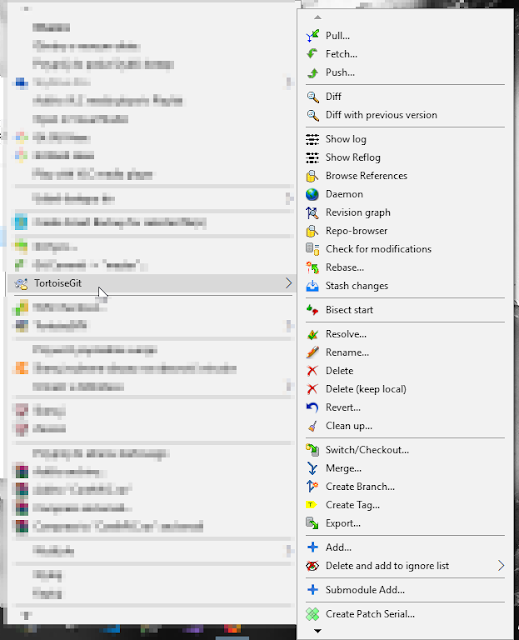 TortoiseSVN also changes the appearance of your project folders, so that you will instantly see if there is some pending commit in a folder, for instance.
- Be sure to learn what you can do with Git. You may check this post on useful Git commands.


Working with Git
There are six fundamental steps which are followed for every small part that you want to add to the Git repository:1) Go to the main branch (usually called master, also quite often develop);
2) Create a new branch (often called a feature if it is a new functionality, or bugfix if it fixes a bug);
3) Commit your work;
4) Go back to the main branch;
5) Merge the modifications ("copy" them from the new branch to the main branch);
6) Delete the new branch if you want to, since it is not necessary any longer.
Usually, in a commercial project, somebody else has to check ("review") your commit after a commit to the remote version of your new local branch. If they accept the commit, they can merge it with the main branch and they have the possibility to delete your remote branch.
See also: Advanced C# terms explained.
Important notes for a novice
There are several points you have to remember about when working with Git:- Unlike in SVN, after you commit your work, it is only committed locally (on your computer). You have to push or commit and push your changes for them to be visible to others on the remote branch. A commit is only a method of "saving" your changes to your own computer, on a branch that you have created on your disk.
- In Git, there is a difference between a fetch and a pull. A fetch gets a list of changes from the remote repository but it does not apply them in your local repository. A pull additionally applies the changes downloaded from the server to your source code. So if you are currently working on some changes in the code, it is usually safer to fetch, and after you have committed all your work, it will usually be time to pull, and then to merge the changes you have fetched (they will be automatically pushed when you merge).
- Copying an existing (remote) repository to your local computer is called "cloning" in Git.
See also: Advanced C# terms explained.
Git commands
Below I list several Git commands which may be of use especially if you are a novice.
1) git init – initializes Git
2) git commit -m "commit-message"
3) git add -u
4) git branch branch-name – creates a new branch
5) git checkout branch-name – changes the selected branch to the one named in this command
6) git flow feature start my-feature – starts a new feature called "my-feature," based on 'develop', and checks out this feature
7) git flow feature finish my-feature – finishes a feature called "my-feature," that is: merges the feature into the 'develop' branch, deletes the feature branch, and checks out 'develop'
8) git stash – hide the current uncommitted changes and save them until later
9) git config --list – shows all current settings
10)
git commit --amend -m "New commit message" – amends last commit message Important notes:
-mis message, and after that you add the message in inverted commas (-m "your message").
Thursday, November 15, 2018
Advanced C# terms explained
Below I list some of the most important notions in advanced C# along with their explanations. The explanations are intended to be as concise as possible, and most of them are 1–2 sentences long. The list is constantly growing.
If you want to know a bit more about some concept and see real-life examples, search this blog or click a link if it is placed next to the explanation.
If you want to know a bit more about some concept and see real-life examples, search this blog or click a link if it is placed next to the explanation.
Abstraction – hiding (or omitting) inessential information while extracting information which is common to a group of objects and invariable. For example, if a washing machine was an instance of a class (an object), the buttons available to its user are "public," while certain mechanisms are hidden or "private" and can only be accessed by experts.
Anonymous method – a method without a name, used in a variable of delegate type.
Delegate – a data type which allows passing a method as a parameter of another method. It includes three essential pieces of information: (1) the address of a method to which it points; (2) the parameters of the method; (3) the return type of a method.
Dependency injection – passing an object (often called a service or a dependency) to a client (a dependent object) which can use this object. Read more.
Design pattern – a universal solution to recurring architectural project problems in software development.
Encapsulation – in object-oriented programming, encapsulation consists in hiding (selected) fields or methods of the objects of a class, so that only the other methods of that class or friend functions can access these fields or methods.
Generics – "T"-elements, where the T's are placeholders in the definition of a class which are replaced with a specific type during compile time. Generics can be used in the fields or methods of the class, in the method parameters, and so on.
Inheritance – the relationship in which a class implements (inherits) the features of another class or interface. Inheritance uses the IS-A relationship, e.g. a cat IS-A mammal, which means that a cat inherits the features of a mammal.
Interface – a structural contract which a class inheriting the interface must follow. Read more about the difference between an interface and an abstract class in C#.
Inversion of Control (IoC) – a design pattern based on the principle that objects should not attempt to receive the required dependencies itself, but those dependencies should rather be provided to them by something which is "outside" of the object. Traditionally, the object used to receive the dependencies itself, so this approach is an "inversion."
LINQ (Language INtegrated Query) – .NET technology to query objects such as: objects implementing the IEnumerable<T> interface, databases and their components, and XML.
ORM (Object-Relational Mapping) – the term usually refers to a mapping tool which allows representing the structure of relational tables in an object-oriented language.
Polymorphism – the object's feature of having many forms. Polymorphism may be static (function overloading and operator overloading) or dynamic (specified at run-time).
Reflection – a way of obtaining metadata of types dynamically (at run-time). Namespace to use: System.Reflection.
SHA-1 – a hash generated by Git for every file/directory and stored in the system's database. It is a 40-character string of hexadecimal characters, i.e. 0–9 and a–f.
Tuple – a finite, ordered sequence of elements which could be of various types and allows nesting.
Virtual method – a complete method which can be used in an inheriting class, and may as well be overridden, which means that the logic of the method can be changed in the inheriting class.
Thursday, November 8, 2018
SQL useful tricks
Below are some of the less-known though useful tricks in T-SQL along with examples of how to apply them. If you know of any other interesting examples of such tricks, please let me know.
Please note that the code listed here will work in MS SQL Management Studio and may not work in Oracle databases, MySQL databases, and in others.
Please note that the code listed here will work in MS SQL Management Studio and may not work in Oracle databases, MySQL databases, and in others.
1. Create a table with the schema from another table
The SELECT INTO statement may be used to create a new, empty table with the schema of an existing table. A false WHERE clause is required, such as the one presented below (thus, the query will return no data):
SELECT * INTO newtable
FROM oldtable
WHERE 1 = 0;
Obviously enough, you can also select only some columns or make joins with
other tables.
2. Check if the data to insert is good
How to check if the data you want to insert into a table is OK:
BEGIN TRAN

 INSERT INTO dbo.TableName ([ColumnNames])
 VALUES (...)

 SELECT TOP (100) ...
 FROM dbo.TableName
 ORDER BY DateColumn DESC

ROLLBACK TRAN
This
way, you will see how the table will look after the rows with your new
data are inserted into it. The transaction will be rolled back, so no
data will actually be inserted into the table.
A question for you: if there is a PRIMARY KEY column, will the values be incremented by the number of rows that were actually not inserted into the table?
(3)
SELECT *
FROM
(--"values constructor"
VALUES (1, 'a'), (2, 'b')
) t(x, y) -- "derived column list"
Subscribe to:
Posts (Atom)